My Coffee Grinder Won’t Grind: Troubleshooting & Fixes
Your coffee grinder won't grind at all often due to power issues, a clogged burr, improper bean loading, or a safety mechanism fault.
Few things are as frustrating for a coffee lover as waking up, craving that perfect cup, only to find your trusty coffee grinder refusing to cooperate. When your coffee grinder won't grind at all, it can throw a serious wrench in your morning routine. But don't fret; with years of experience navigating the nuances of coffee equipment, I've learned that many of these issues are surprisingly simple to diagnose and fix. This guide will walk you through the common culprits and practical solutions, ensuring you can get back to enjoying freshly ground coffee without a hitch.
Understanding Your Coffee Grinder: A Quick Overview
Before diving into troubleshooting why your coffee grinder won't grind at all, it helps to understand how these marvelous machines work. Whether you have a blade grinder, which essentially chops beans with a spinning blade, or a burr grinder, which grinds beans uniformly between two abrasive surfaces, the basic principle is to break whole beans into smaller particles. Burr grinders are generally preferred for quality and consistency, using either conical or flat burrs. Both types rely on electrical power to move their grinding components and require proper bean flow to function. When your coffee grinder won't grind, it often points to a disruption in this fundamental process.

Common Reasons Your Coffee Grinder Stops Grinding
When your coffee grinder won't grind, it’s usually one of a few common problems. From simple user errors to minor mechanical glitches, these issues can often be resolved with a bit of systematic checking. My experience has shown that most people jump to the worst conclusion, but often it's something straightforward.
- No Power Supply: This is the most basic check. Is the grinder plugged in? Is the outlet working? Sometimes, a tripped circuit breaker or a loose plug is all it takes to stop your coffee grinder dead in its tracks.
- Safety Mechanisms: Many modern grinders have built-in safety features. This could be a lid that isn't properly secured or a bean hopper that's not seated correctly. If these aren't engaged, your coffee grinder won't grind to prevent injury or damage.
- Overheating: If you've been grinding a lot of coffee, especially in larger quantities, your grinder's motor might have overheated. Many models have a thermal cut-off switch that activates to protect the motor, causing your coffee grinder won't grind temporarily.
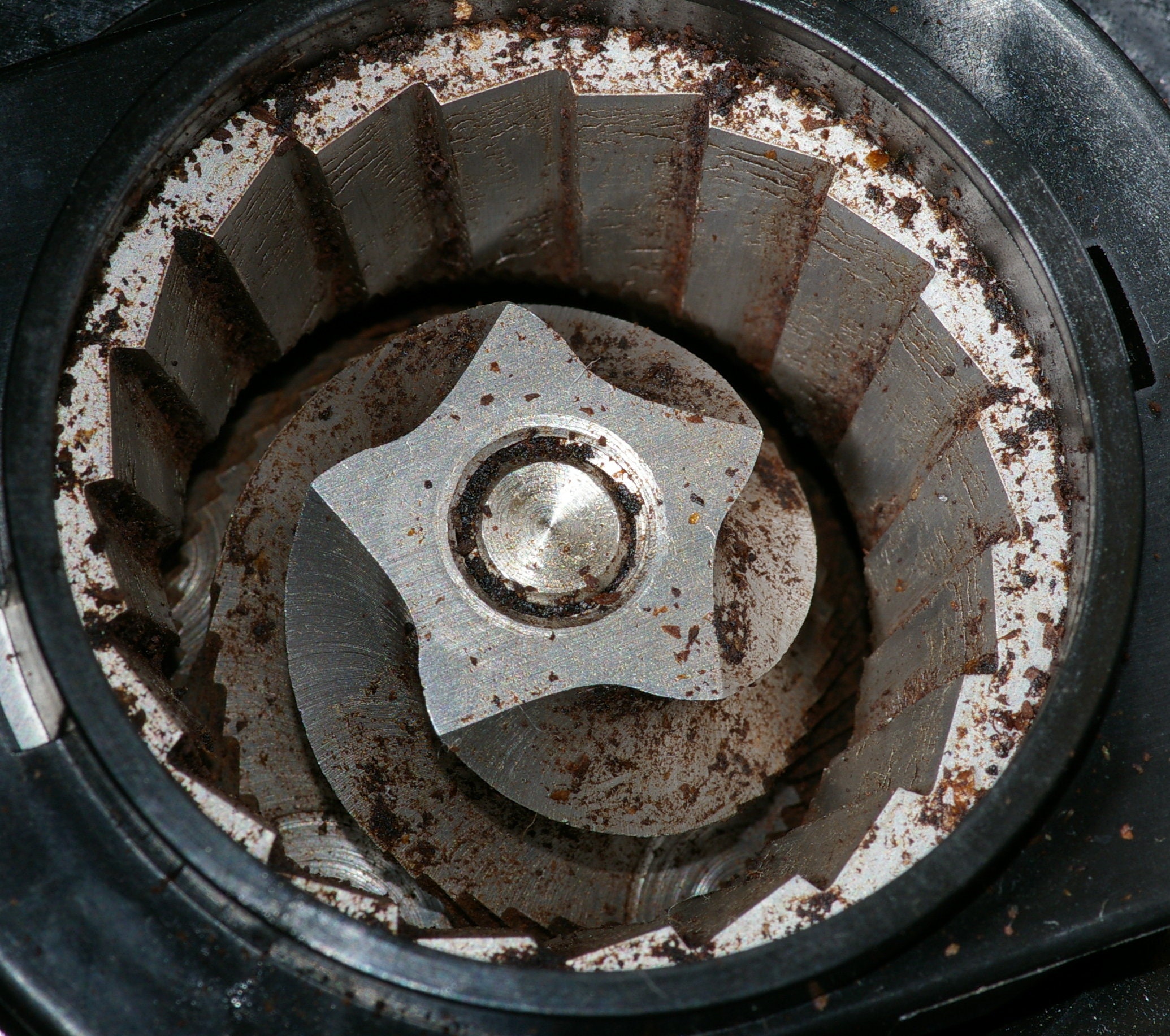
- Blockages or Clogs: Coffee beans, especially oily ones, or even small foreign objects can clog the burrs or the dispensing chute. This is a very common reason why your coffee grinder won't grind.
- Improper Assembly: After cleaning, it's easy to reassemble a grinder incorrectly. If parts like the burrs or hopper aren't seated right, your coffee grinder won't grind.
Troubleshooting Power and Electrical Issues
When your coffee grinder won't grind at all, the very first thing to check is its power supply. This might sound obvious, but you'd be surprised how often it's the culprit. I've had countless mornings saved by simply re-plugging a grinder!
-
Check the Outlet:
- Make sure the grinder is firmly plugged into a working electrical outlet. Try plugging in another small appliance (like a phone charger or a lamp) into the same outlet to confirm it has power.
- If the outlet isn't working, check your home's circuit breaker box. A tripped breaker might be the issue. Flip it off and then back on.
-
Inspect the Power Cord:
- Carefully examine the power cord for any visible damage, kinks, or frayed wires. A damaged cord can prevent power from reaching the motor, causing your coffee grinder won't grind. If damaged, do not use the grinder and seek professional repair or replacement.
-
Reset the Grinder:
- Some grinders have a reset button, especially if they've overheated. Consult your grinder's manual to see if yours has one and how to use it. Unplugging the grinder for a few minutes and then plugging it back in can also sometimes reset internal systems.
:max_bytes(150000):strip_icc()/sea-primary-coffee-grinders-oct-24-nsimpson-207-b439c1ef1a674697b2825604e5321d5c.jpeg)
Addressing Bean-Related Problems
Believe it or not, the beans themselves can be a major factor when your coffee grinder won't grind. It's not just about what kind of beans, but how they interact with the grinder.
- Bean Type and Oiliness: Very oily, dark roast beans can leave residue that builds up on the burrs, leading to clogs. This is especially true for blade grinders and some burr grinders not designed for high oil content. Over time, this residue can prevent the burrs from moving freely, making your coffee grinder won't grind.
- Foreign Objects: This is a less common but significant issue. Sometimes, a small stone, a piece of plastic from the bean bag, or even an unroasted coffee bean (a "quaker") can find its way into the hopper. These hard objects can jam the burrs or blades, causing your coffee grinder won't grind and potentially damaging the motor. Always visually inspect your beans before pouring them into the hopper.
- Overfilling the Hopper: While tempting to fill the hopper to the brim, some grinders perform better with smaller batches. Overfilling can sometimes restrict the flow of beans into the grinding chamber, creating a bottleneck that makes it seem like your coffee grinder won't grind.
- Incorrect Grind Setting: If the grind setting is too fine for the type of grinder or if the burrs are already slightly clogged, selecting a very fine setting can sometimes cause the burrs to seize up or jam, particularly if there's residual coffee present.
Dealing with Blockages and Clogs
Blockages are probably the most frequent reason your coffee grinder won't grind. They are also, thankfully, often the easiest to fix with a little care and attention.
-
Unplug First:
- Always, always unplug your coffee grinder before attempting to clear any blockages. Safety is paramount when dealing with moving parts.
-
Clear the Hopper:
- Remove any remaining coffee beans from the hopper. You might need to gently shake or tap the grinder to dislodge beans stuck in the chute leading to the burrs.
-
Access the Burrs (or Blades):
- For most burr grinders, you can remove the top burr or assembly. Consult your manual for specific instructions on how to do this safely. Once exposed, use a stiff brush (often provided with the grinder) or a dry toothbrush to thoroughly clean the burrs and the grinding chamber. Look for any compacted coffee grounds or foreign objects.
- For blade grinders, carefully clean the area around the blades, ensuring no caked-on coffee impedes their movement.
-
Check the Chute:
- After the beans are ground, they exit through a dispensing chute. This chute can become clogged with fine coffee dust and oils, especially with darker roasts or very fine grind settings. Use your brush, a pipe cleaner, or even a toothpick to carefully clear this chute.
-
Reassemble and Test:
- Once everything is clean, reassemble your grinder, ensuring all parts are correctly seated. Plug it back in and try grinding a small amount of coffee. If your coffee grinder won't grind after this, further investigation might be needed.

Maintenance and Cleaning for Optimal Performance
Regular cleaning is not just about keeping your grinder sanitary; it's crucial for preventing issues like your coffee grinder won't grind at all. Think of it as preventative medicine for your morning brew. A clean grinder is a happy grinder.
- Daily Wipe-Down: After each use, give the hopper and grounds container a quick wipe to remove loose coffee dust. This prevents buildup.
- Weekly Deep Clean: Depending on how much you grind and the type of beans, aim for a weekly deep clean. This involves removing the hopper and burrs (if applicable) and brushing away all accumulated grounds and oils. For burr grinders, you can also run specialized grinder cleaning tablets through them; these tablets are usually made of food-safe grains that absorb oils and dislodge old grounds.
- Avoid Water: Never submerge electrical components in water. Most grinder parts should be cleaned with a dry brush or cloth. If you must use a damp cloth, ensure the parts are completely dry before reassembling.
- Proper Storage: Store your coffee grinder in a cool, dry place. Humidity can cause coffee beans to swell and stick, potentially leading to future clogs or making your coffee grinder won't grind.
By consistently maintaining your grinder, you significantly reduce the chances of encountering a frustrating "my coffee grinder won't grind at all" scenario.

When to Consider Professional Repair or Replacement
While many issues can be fixed at home, there are times when your coffee grinder won't grind because of something more serious. Knowing when to call in the experts or invest in a new machine can save you time and further frustration.
- Motor Failure: If the grinder makes no sound or movement even when properly plugged in and free of blockages, it might be a motor issue. This is often beyond typical home repair, and a new motor might be as costly as a new grinder.
- Damaged Burrs: While you can often replace burrs yourself, sometimes the mechanism holding them or the drive shaft itself can be damaged. If your grinder still makes noise but isn't effectively grinding, even after cleaning, the burrs might be worn or misaligned beyond simple adjustment.
- Persistent Electrical Problems: If you've checked the outlet, cord, and reset options, but the grinder still shows no signs of life, there could be an internal electrical fault. For safety reasons, this is best left to a professional.
- Cost vs. New: If the estimated repair cost for your coffee grinder won't grind at all is close to or exceeds the price of a new, comparable grinder, it's often more economical to replace it. This is especially true for entry-level models.
- Warranty: Check if your grinder is still under warranty. If so, contact the manufacturer or retailer for repair or replacement options.
Sometimes, after years of faithful service, it might just be time to upgrade. Modern grinders offer improved features and durability, so a new purchase can be a worthwhile investment in your coffee journey.
Frequently Asked Questions of My Coffee Grinder Won't Grind at All — What to Check
Why does my coffee grinder hum but not grind?
If your coffee grinder hums but doesn't grind, it usually means the motor is receiving power but the burrs or blades are jammed. This could be due to a clog of coffee grounds, a foreign object, or an overly tight grind setting preventing rotation.
Can old coffee beans cause a grinder to stop working?
While old coffee beans themselves don't typically cause a grinder to stop working, very oily or stale beans can leave sticky residue that builds up and clogs the grinding mechanism over time, eventually leading to a blockage where your coffee grinder won't grind.
How often should I clean my coffee grinder?
For optimal performance and to prevent issues like blockages, you should perform a light clean (wiping down) daily and a more thorough deep clean (brushing burrs) weekly or bi-weekly, depending on usage and bean oiliness.
Is it safe to try to fix my coffee grinder myself?
Many simple fixes like clearing clogs or checking power are safe to do yourself after unplugging the grinder. However, for internal electrical issues, motor problems, or complex mechanical failures, it's safer to consult a professional or consider replacement.
What should I do if my burr grinder is stuck on a fine setting?
If your burr grinder is stuck on a fine setting and won't grind, try unplugging it, emptying the hopper, and then gently cleaning the burrs and grinding chamber. Sometimes running a coarser grind setting with no beans, or using grinder cleaning tablets, can help loosen residual grounds.
Conclusion
Encountering a situation where your coffee grinder won't grind at all can be incredibly frustrating, but as we've explored, many of these issues have straightforward solutions. From ensuring a proper power connection and checking safety mechanisms to diligently clearing stubborn blockages and maintaining a clean machine, a little investigative work can often get your grinder back up and running. Remember, regular maintenance is your best defense against such morning mishaps. Don't let a silent grinder ruin your day; use these tips to diagnose and resolve common problems, keeping your fresh coffee ritual uninterrupted. If you're still facing trouble, considering professional help or an upgrade might be the next step to enjoying that perfect cup.