Coffee Grinder Problems: Simple Solutions & Quick Fixes
Common coffee grinder problems often stem from clogs, wear and tear, or electrical issues, and are usually fixable with cleaning, adjustment, or minor part replacement.
As a passionate coffee enthusiast and long-time home barista, I know firsthand the sheer frustration of a beloved coffee grinder acting up. It can turn your morning ritual into a grinding halt, leaving you with whole beans and a craving for that perfect cup. Having navigated countless troubleshooting scenarios over the years, from simple clogs to more complex motor issues, I’m here to share an in-depth guide on common coffee grinder problems and how to fix them. You'll gain the expertise to tackle these glitches confidently, ensuring your journey to a delicious brew remains smooth and uninterrupted.

Understanding Your Coffee Grinder
Before we dive into fixing things, let's appreciate the unsung hero of your coffee setup: the grinder. Its job is simple yet vital – to transform whole coffee beans into uniformly sized particles. This consistency is paramount for proper extraction, whether you're brewing espresso, pour-over, or French press. Without a reliable grinder, even the best beans can yield a disappointing cup.
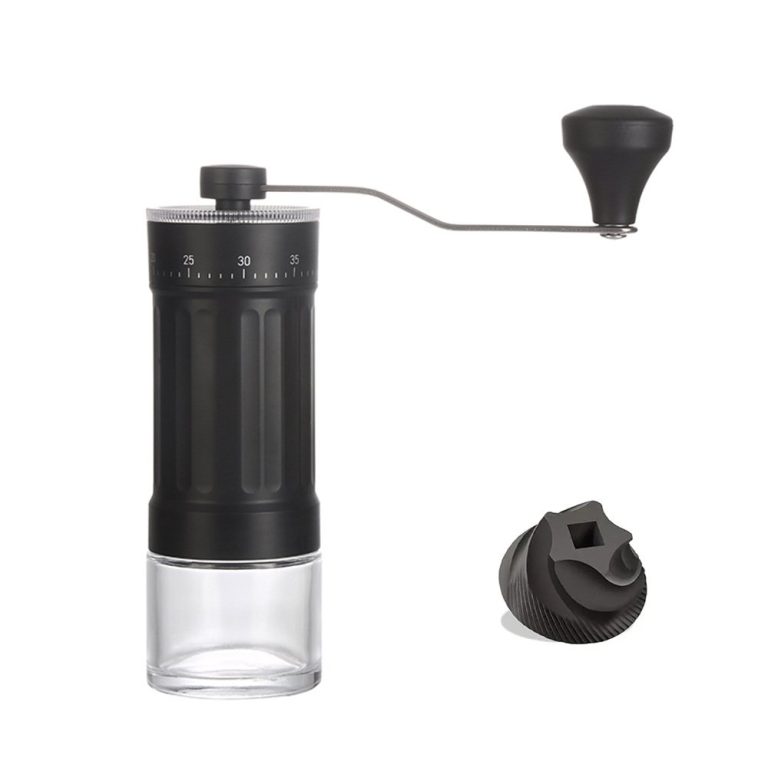
Generally, you'll encounter two main types: blade grinders, which chop beans with spinning blades, and burr grinders, which crush them between abrasive surfaces. While blade grinders are more affordable, burr grinders offer superior consistency and are often at the heart of common coffee grinder problems when they falter. Regular maintenance is key, as neglect can lead to a host of issues that compromise your coffee quality and the grinder's lifespan.
Common Coffee Grinder Problems and How to Fix Them
It's inevitable that over time, even the most robust coffee grinders might encounter a snag. But don't despair! Most common coffee grinder problems have straightforward solutions.
Grinder Won't Turn On
This is perhaps the most alarming of all common coffee grinder problems. You push the button, and… nothing.
- Causes: The most frequent culprits are a loose power cord, a tripped circuit breaker, an engaged safety switch (often on the hopper or lid), or an overheated motor. Sometimes, if the grinder is severely clogged, the motor might be overloaded and refuse to start.
- Fixes: First, check that the grinder is securely plugged into a working outlet. If not, try another outlet. Next, check your home's circuit breaker box to see if any switches are tripped. Many grinders have a safety interlock; ensure the hopper and lid are correctly seated and locked into place. If you've been grinding for a while, the motor might have overheated; let it rest for 15-30 minutes to cool down. From my experience, a simple oversight like a slightly misaligned hopper is often the culprit, making you think the grinder is dead when it's just being safe.
Inconsistent Grind Size
A consistent grind is the cornerstone of great coffee. If your grinder is producing a mix of fine dust and coarse chunks, it's a significant issue.
- Causes: Worn-out burrs are a primary suspect, as their abrasive surfaces degrade over time, losing their ability to crush beans evenly. Burrs can also become misaligned, or excessive oil buildup from dark roast beans can impede their function. Using stale or overly oily beans can also contribute to this problem, as they don't grind as cleanly.
- Fixes: Begin by thoroughly cleaning your grinder, especially the burrs and grinding chamber, to remove any oil or old coffee particles. If the problem persists, visually inspect the burrs for signs of wear; if they look dull or chipped, it's likely time for replacement. Some grinders allow for burr alignment adjustments, which you might be able to do yourself with a manual or by consulting a repair guide. I once spent weeks trying to dial in a pour-over recipe, only to discover my burrs were so worn they couldn't produce anything finer than French press consistency! Replacing them was a game-changer.
Grinder is Clogged
A clog can bring your grinding process to a complete halt, often manifesting as beans not feeding or the motor struggling.
- Causes: This common coffee grinder problem is typically due to a buildup of oily coffee residue, especially with dark roast beans. Grinding very fine can also lead to clogs, as the tiny particles compact easily. Moisture in the beans or ambient humidity can also contribute to coffee grounds sticking together.
- Fixes: Unplug the grinder first! Then, carefully disassemble the burrs and grinding chamber according to your manual. Use a stiff brush, a small vacuum cleaner, or compressed air to remove all coffee particles and oil residue. Specialized grinder cleaning tablets (like Urnex Grindz) can also help break down oily buildup without disassembly. I remember a particularly stubborn clog that made me think my grinder was broken; it just needed a good deep clean, which surprisingly involved a lot of elbow grease and a tiny brush!
Excessive Noise or Grinding Struggles
If your grinder sounds like it's fighting a small war or straining more than usual, something isn't right.
- Causes: The most concerning cause is a foreign object, like a small pebble or metal shard, that made its way into the beans. It could also indicate motor strain due to a heavy workload, misaligned burrs grinding against each other, or issues with the motor bearings.
- Fixes: Immediately unplug the grinder and empty the hopper. Carefully inspect the burrs and grinding chamber for any foreign objects. If you find one, remove it. If the noise persists without an obvious obstruction, it might be a mechanical issue like misaligned burrs or a failing motor. For these more complex common coffee grinder problems, consulting the manufacturer's support or a professional repair service is often the best course of action. It's like your car making a strange knocking sound – you don't ignore it!
Static Cling
Coffee grounds scattering everywhere due to static electricity is a messy and frustrating common coffee grinder problem.
- Causes: This usually occurs in dry environments or with certain types of plastic hoppers and collection bins. The friction of grinding generates an electrical charge, causing grounds to stick to surfaces or fly out.
- Fixes: A simple trick is the RDT (Rao's Distribution Technique): spray a single mist of water on your beans before grinding. This tiny bit of moisture helps dissipate the static. You can also try wiping down plastic parts with an anti-static cloth or using a dryer sheet. Increasing the humidity in your grinding area can also help. I used to dread grinding certain beans because of the static mess, but a quick spritz of water makes all the difference, keeping the grounds neatly contained.
Beans Not Feeding
Your grinder is on, but the beans just sit in the hopper, refusing to go into the burrs.
- Causes: This can happen if the beans are too moist, making them sticky and less likely to slide down. Overly oily beans can also clump together. Sometimes, the grind setting is too fine for the bean type, creating a blockage at the entrance to the burrs.
- Fixes: Ensure your beans are stored in an airtight container to prevent moisture absorption. If you suspect moisture, try drying them out slightly by spreading them on a tray for a short period. For oily beans, regular cleaning of the hopper and burr area is crucial. You can also gently agitate the hopper to encourage the beans to feed, or try a slightly coarser grind setting if the issue is with very fine grinding.
Preventative Maintenance for Your Coffee Grinder
An ounce of prevention is worth a pound of cure, especially when it comes to common coffee grinder problems. Following a few simple maintenance steps can dramatically extend your grinder's life and ensure consistent performance.
- Regular Cleaning: This is the single most important step. Depending on how often you grind and the oiliness of your beans, aim for a weekly brush-down and a deeper cleaning (disassembly and scrubbing) every 2-4 weeks. This prevents oil and fine particle buildup that leads to clogs and inconsistent grinds.
- Use Fresh, Quality Beans: Oily, stale, or poorly roasted beans are often harder on your grinder. Freshly roasted beans with a moderate oil content tend to grind more consistently and leave less residue. Avoid using flavored beans, as their artificial oils can quickly gunk up your burrs.
- Don't Overfill the Hopper: While it might seem convenient, overfilling the hopper can put unnecessary strain on the motor and lead to beans not feeding properly. Only put in the amount of beans you plan to grind for that session.
- Store Properly: Keep your grinder in a dry, cool place, away from direct sunlight. This helps prevent moisture accumulation that can affect bean quality and contribute to static and clogging.
When to Call a Professional or Replace Your Grinder
While many common coffee grinder problems are DIY-friendly, there are times when it’s best to seek expert help or consider an upgrade.
If you’ve tried all the troubleshooting steps for issues like a non-starting motor, persistent loud noises, or electrical malfunctions, and the problem remains, it might be time for professional intervention. Some manufacturers offer repair services, or local appliance repair shops might be able to help. Consider the cost of repair versus the cost of a new grinder. If the repair cost is approaching that of a new, reliable grinder, an upgrade might be more economical in the long run. Also, if your burrs are severely worn and replacement parts are unavailable or costly, it could be a sign to invest in a newer model. As someone who has "resurrected" many appliances, I've also learned when to finally let go and embrace the new technology.

Frequently Asked Questions about Common Coffee Grinder Problems
How often should I clean my coffee grinder?
For optimal performance and to avoid common coffee grinder problems, a light cleaning (brushing out grounds) is recommended weekly, with a deeper clean (disassembly) every 2-4 weeks, depending on usage and bean oiliness.
Can I use rice to clean my coffee grinder?
While some advocate for it, using rice to clean a coffee grinder is generally not recommended, especially for burr grinders, as rice is harder than coffee beans and can dull or damage the burrs, exacerbating common coffee grinder problems. Stick to specialized grinder cleaning tablets or a stiff brush.
What's the difference between burr and blade grinders for problem-solving?
Burr grinders typically face issues like worn burrs, clogs due to fine grounds, or motor strain. Blade grinders, on the other hand, are simpler and mostly deal with inconsistent grind issues or motor failure, as they don't have adjustable burrs.
How do I know if my burrs are worn out?
You'll notice worn burrs by an increasingly inconsistent grind size, a need for finer settings to achieve the same grind, or visible dullness or damage on the burr surfaces when inspected. This is a tell-tale sign of common coffee grinder problems related to performance.
Is it normal for my grinder to get hot?
Some warmth during operation is normal, especially after grinding a larger batch or on a very fine setting. However, excessive heat, burning smells, or the grinder shutting off due to overheating are signs of a problem, often indicating motor strain or a serious clog.
Conclusion
Navigating the world of common coffee grinder problems might seem daunting at first, but with the right knowledge and a bit of patience, most issues are easily resolved. By understanding your grinder's mechanics, committing to regular cleaning, and knowing when to troubleshoot or seek professional help, you can ensure your device consistently delivers the perfect grind for your daily brew. Don't let a minor hiccup derail your coffee journey; embrace these tips to keep your grinder (and your coffee) in top-notch condition. If you found this guide helpful, consider exploring our other coffee-related resources or sharing your own grinder troubleshooting triumphs in the comments below!