Coffee Grinder Not Working: Common Fixes
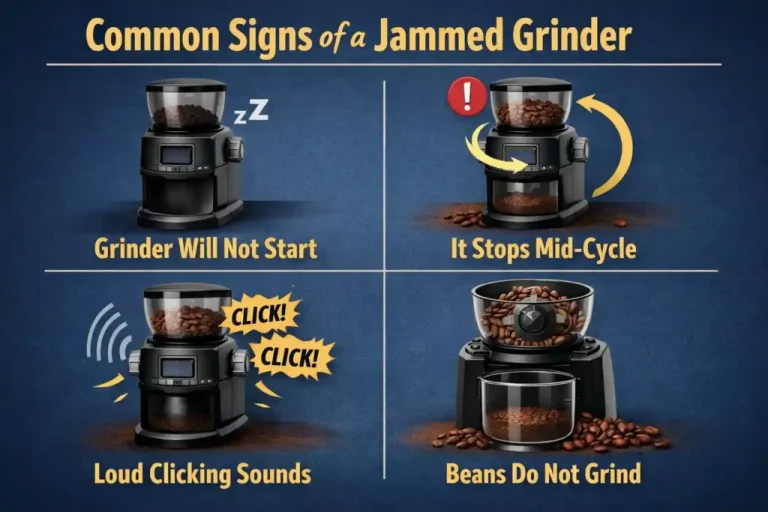
Most coffee grinders stop working due to clogs from oily beans, electrical issues, motor overheating, or worn-out burrs.
There's nothing quite as frustrating as waking up craving that perfect cup, only to find your trusty coffee grinder refusing to cooperate. As someone who's spent countless mornings troubleshooting various models, I can tell you that a seemingly dead grinder often has a simple, common fix. This guide will help you understand why your coffee grinder might not be working and equip you with practical solutions to get it back up and running, saving your morning brew and your sanity.

Understanding Your Coffee Grinder: A Quick Overview
Before diving into troubleshooting, it helps to know a little about how your coffee grinder works. Most household grinders fall into two main categories: blade grinders and burr grinders. Blade grinders use a spinning blade to chop coffee beans, while burr grinders crush them between two abrasive surfaces, offering a more consistent grind. Understanding the type you own can often point you towards specific grinder problems. Regardless of the type, these machines rely on a motor, power supply, and a grinding mechanism, all of which can be potential points of failure when your coffee grinder is not working.

The Most Common Culprit: Clogs and Blockages
In my experience, the number one reason a coffee grinder stops working is a clog. It’s like a traffic jam in your grinder’s internal workings, preventing the beans from moving through or the burrs from spinning freely. Oily coffee beans, especially dark roasts, can leave sticky residues, and very fine grind settings can produce a powder that easily compacts and jams the mechanism. This is a classic example of why your coffee grinder might not be working, and thankfully, it’s often an easy fix.
What Causes Grinder Clogs?
Clogs are primarily caused by a buildup of coffee grounds and oils. When I first started experimenting with different roasts, I noticed my grinder struggling more with darker, oilier beans if I didn't clean it regularly. Fine grind settings also contribute, as the smaller particles have a greater tendency to clump together, especially if there's any moisture involved. This residue hardens over time, creating a stubborn blockage that can make your coffee grinder not working at all.
How to Clear a Clog
Clearing a clog is usually a straightforward process, but safety is paramount. Always unplug your grinder before you begin any maintenance.
- Unplug the Grinder: This is non-negotiable to prevent accidental activation and injury.
- Disassemble the Hopper and Burrs: For burr grinders, carefully remove the bean hopper and the top burr assembly. Consult your grinder's manual if you're unsure how. Blade grinders are simpler, usually just requiring removal of the lid and sometimes the grinding chamber itself.
- Clean with a Brush and Vacuum: Use a stiff brush (many grinders come with one) to dislodge packed grounds from the burrs, chute, and grinding chamber. For stubborn clogs, a small vacuum cleaner can be incredibly effective at sucking out loose particles. I've found that a dedicated coffee grinder brush gets into all the nooks and crannies that a general kitchen brush misses.
- Reassemble: Once everything is clean and clear, reassemble your grinder. Make sure all parts are securely in place, as many grinders have safety interlocks that prevent operation if components aren't correctly seated.
Power Problems and Electrical Issues
Sometimes, your coffee grinder not working isn't a problem with the grinder itself, but with its power supply. It's a fundamental check, but one that's often overlooked in the panic of a silent grinder. From simple unplugged cords to more complex internal wiring issues, electrical problems can completely incapacitate your machine.
Not Turning On At All?
If your grinder is completely lifeless, start with the most obvious electrical checks.
- Check the Power Outlet: Plug another small appliance into the same outlet to ensure it's functioning. Sometimes, an outlet simply goes dead.
- Inspect the Circuit Breaker: If multiple appliances aren't working in that area, a tripped circuit breaker might be the culprit. Resetting it could bring everything back to life.
- Examine the Power Cord: Look for any visible damage, frayed wires, or loose connections in the grinder's power cord. A damaged cord is a serious safety hazard and requires replacement.
Intermittent Power
If your grinder sometimes works, and sometimes doesn't, or cuts out mid-grind, the issue might be more subtle.
- Internal Wiring: While harder to diagnose without specialized tools, loose internal wiring can cause intermittent power. This is generally a job for a professional, as opening up electrical appliances can be risky.
- Motor Issues: An aging or struggling motor might not consistently draw power, leading to sporadic operation. This often manifests as a weak grind or unusual noises before the grinder completely fails.

Motor Malfunctions and Overheating
The motor is the heart of your coffee grinder, providing the power to spin the blades or burrs. When your coffee grinder is not working, a malfunctioning or overheated motor is a significant possibility. I once tried to grind particularly hard spices in my coffee grinder, and the distinct burning smell and eventual shutdown taught me a valuable lesson about respecting the motor's limits!
Why Motors Fail
Several factors can lead to motor failure or performance issues.
- Overuse: Continuously grinding large quantities of beans without giving the motor a break can lead to overheating and premature wear.
- Grinding Hard Items: Attempting to grind anything other than roasted coffee beans (like unroasted beans, nuts, or spices not intended for the grinder) can strain the motor beyond its capacity, causing damage.
- Bearing Issues: Over time, the bearings that support the motor's shaft can wear out, increasing friction and heat, and eventually leading to motor seizure.
What to Do About Overheating
If your grinder feels hot to the touch or emits a burning smell, it’s likely overheating.
- Rest the Grinder: Immediately unplug it and let it cool down completely for at least 30 minutes. Most grinders have thermal overload protection that will temporarily shut off the motor to prevent damage.
- Check Ventilation: Ensure the grinder's ventilation slots are not blocked by dust or other debris, allowing proper airflow to cool the motor.

Burr Problems: Wear and Tear or Misalignment
For burr grinders, the burrs themselves are critical. They do the actual grinding, and if they're not in top condition or properly aligned, your coffee grinder will not be working efficiently, or at all. I learned this the hard way when my morning espresso started tasting sour; it turned out my burrs were so dull they were just smashing the beans, not grinding them precisely.
Worn-Out Burrs
Like any cutting surface, burrs wear down over time, especially with frequent use.
- Symptoms: You might notice an inconsistent grind (more fines or boulders than usual), a significant increase in grinding time, or a louder, more strained noise during operation. If your grinder sounds like it's struggling to process beans, even when clean, worn burrs are a strong indicator.
- When to Replace: Burr replacement frequency depends on usage and bean type, but generally, quality burrs last several years. Check your manufacturer's recommendations or inspect them visually for dullness or chips.
Misaligned Burrs
Sometimes, the burrs aren't worn, but they aren't sitting correctly.
- How to Check: Visually inspect the burrs for any obvious gaps or unevenness when the grinder is empty and off. A simple grind test can also reveal misalignment; if the resulting grounds are wildly inconsistent or the grinder jams even with clean burrs, misalignment might be the issue.
- Adjusting: Some grinders allow for user adjustment or recalibration of the burrs. Refer to your manual, as this process varies widely by model. For many entry-level grinders, however, significant misalignment might mean a trip to a service center or considering a replacement.

Safety Features and Interlocks
Modern coffee grinders are equipped with various safety features designed to prevent accidents and damage. While these are crucial for user protection, they can sometimes be the reason your coffee grinder is not working if they're not engaged correctly. It's often a simple oversight, but one that can leave you scratching your head.
- Lid Detection: Many grinders won't operate unless the bean hopper lid is securely in place. Check that it's properly seated and latched.
- Hopper Interlock: Similarly, some burr grinders require the bean hopper to be fully locked into position before they will turn on. Make sure it's twisted or pushed in all the way.
- Overload Protection: As mentioned with motor issues, many grinders have an automatic shut-off feature that activates if the motor is overstrained or overheated. Giving the grinder a rest usually resolves this.
- Grind Chamber Alignment: For some models, especially those with removable grind chambers, the chamber must be correctly aligned and secured for the grinder to function.
Troubleshooting these interlocks is usually a matter of ensuring all components are properly assembled and locked into place according to your grinder's design. Don't force anything; gentle but firm seating is usually all that's needed.

The Importance of Regular Maintenance and Cleaning
Preventative maintenance is the best cure for most grinder problems. If you want to avoid your coffee grinder not working at the worst possible moment, a consistent cleaning schedule is key. My personal rule of thumb is a quick clean weekly and a deep clean monthly. This not only extends the life of your grinder but also ensures better-tasting coffee by preventing stale oil buildup.
- Daily/Weekly Cleaning: After each use, tap out any residual grounds. For a quick weekly clean, remove the hopper and burrs (if applicable) and brush away loose grounds. This prevents the initial buildup that leads to clogs.
- Deep Cleaning Schedule: Once a month, or more often if you use oily beans, perform a thorough cleaning. This involves full disassembly, brushing, and potentially using a vacuum. Some people use specialized grinder cleaning tablets that absorb coffee oils and help dislodge old grounds. These tablets are often food-safe and can be ground like coffee beans, providing an effortless way to clean the internal mechanisms.
- Impact on Longevity and Performance: Regular cleaning isn't just about preventing your coffee grinder from not working; it's about maintaining grind consistency and ensuring the purest flavor from your beans. A clean grinder runs more efficiently and will last much longer.

When to Call a Professional or Replace Your Grinder
While many coffee grinder problems can be solved with a bit of DIY troubleshooting, there comes a point when professional help or a replacement is the wisest course of action. Knowing your limits can save you time, frustration, and potential injury.
- DIY Limits: If you've checked for clogs, power issues, and basic component alignment, and your coffee grinder is still not working, it might be time to consider external help. Electrical problems beyond a simple cord replacement or deep-seated motor issues are typically best left to qualified technicians. Attempting complex repairs without expertise can be dangerous and may void warranties.
- Cost-Benefit Analysis: Before spending money on repairs, weigh the cost against the price of a new grinder. For older, cheaper models, a significant repair might cost more than a brand-new, entry-level unit. For higher-end grinders, investing in a repair might be more economical than replacing a quality machine.
- Signs It's Time for an Upgrade: If your grinder repeatedly fails, requires frequent repairs, or consistently produces an inconsistent grind despite proper cleaning and maintenance, it might be signaling its retirement. Sometimes, a "coffee grinder not working" situation is an opportunity to invest in a newer, more efficient model that better suits your coffee habits.

Frequently Asked Questions
Why is my coffee grinder humming but not grinding?
This usually indicates the motor is receiving power but cannot turn the grinding mechanism. The most common cause is a severe clog or blockage, or potentially an issue with the motor struggling against resistance.
Can I use my coffee grinder for spices?
While some blade grinders can handle spices, it's generally not recommended for burr grinders. Spices can leave strong odors and residues that taint future coffee grounds, and their hardness can damage the burrs.
How often should I clean my coffee grinder?
For optimal performance and to prevent your coffee grinder from not working, a quick brush-out after each use and a more thorough deep clean every two to four weeks is recommended, especially with oily dark roasts.
Is it normal for my coffee grinder to get hot?
Some warmth during operation is normal, as the motor generates heat. However, if your grinder becomes excessively hot to the touch or emits a burning smell, it's a sign of overheating, often due to overuse or a struggling motor.
What's the lifespan of a typical coffee grinder?
The lifespan varies significantly by type and quality. Blade grinders might last a few years, while well-maintained burr grinders, especially those with high-quality steel burrs, can last five to ten years or more with occasional burr replacement.
Conclusion
Encountering a coffee grinder that’s not working can certainly disrupt your morning ritual, but as we've explored, many common issues have straightforward solutions. From clearing stubborn clogs to checking power sources, understanding your grinder's mechanics empowers you to tackle these problems head-on. Regular maintenance is your best defense against unexpected breakdowns, ensuring your machine consistently delivers the perfect grind. Don't let a silent grinder ruin your day; armed with these tips, you can troubleshoot with confidence and get back to brewing delicious coffee. If you're still having trouble, consider checking your grinder's manual or reaching out to the manufacturer for specific guidance.